HOTEL BOOKING SYSTEM FOR UK HOTELS

One system for bookings.
More control for your team.
More time for your guests.

RoomRaccoon brings your PMS, booking engine, channel manager and integrated payments together in one cloud-based hotel booking system. Manage direct and OTA reservations, room availability and guest details from one place, with connected workflows for independent UK hotels, B&Bs and guest houses.

  • Connect website bookings, availability and payments
  • Get personalised onboarding and team training
  • Explore your hotel's booking workflow in a demo

See how your team could manage a booking from first enquiry to check-out.

Request a demo


WHY ROOMRACCOON?

A connected booking system for your hotel

CORE PLATFORM

From online booking to check-out, in one connected system
PROPERTY MANAGEMENT SYSTEM

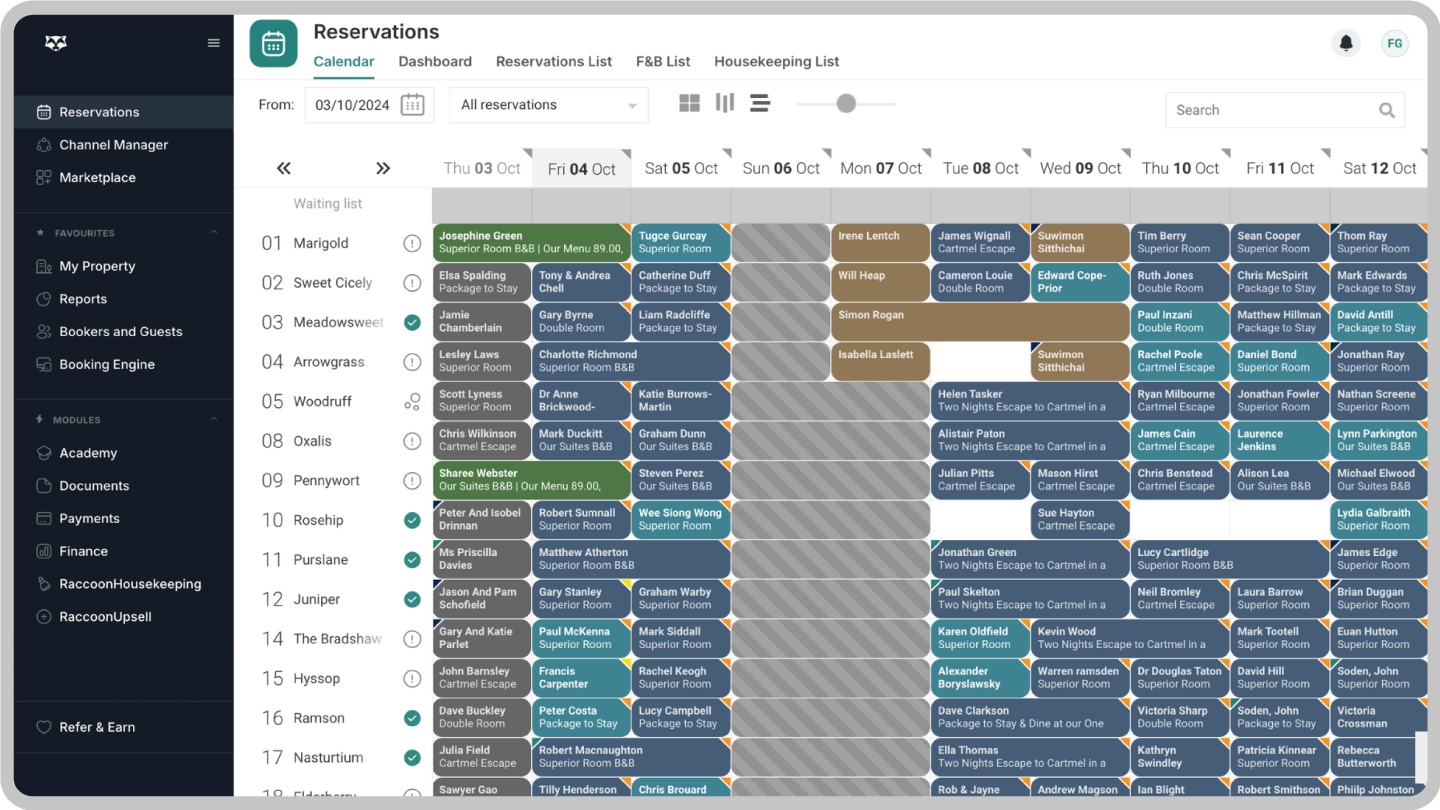
Manage room bookings in one clear calendar

Your property management system brings reservations, guest details and daily tasks together. View arrivals, departures and room assignments, then manage changes without juggling separate booking records. Explore the day-to-day tools in our hotel reservation software.

  • See your reservations at a glance. Use the calendar to manage room allocations, extend stays and arrange room upgrades.
  • Prepare for each arrival. Offer online check-in and check-out, and introduce bookable extras through the RaccoonUpsell upgrade.
  • Build the rates your guests need. Configure packages and linked room rates, and organise group bookings with Room Allotment.
  • Keep track of the details. Review deposits and operational reports so reception and management can plan the day ahead.

BOOKING ENGINE

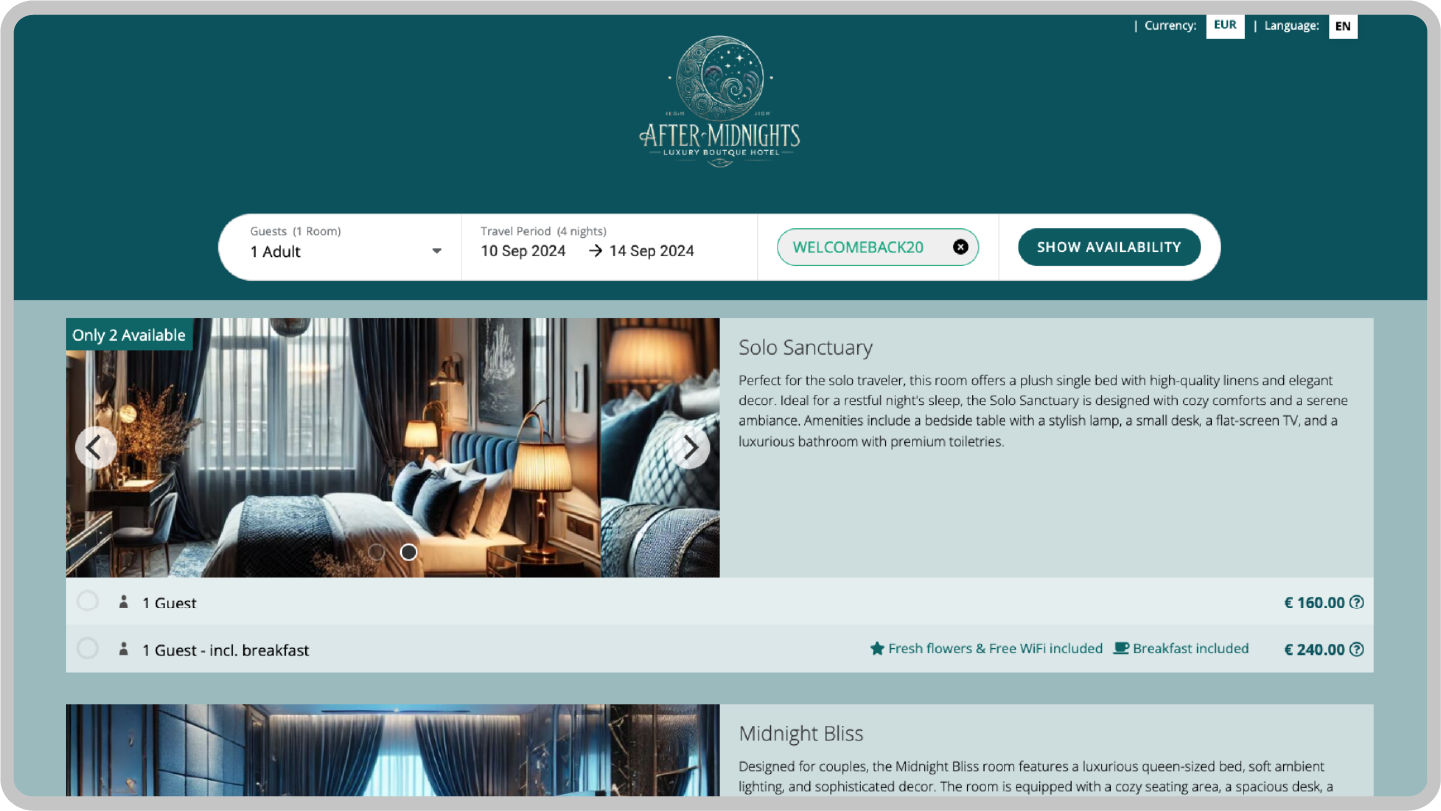
Make your website a direct booking channel

Let guests check availability and reserve a room on your own website. RoomRaccoon's hotel booking engine connects the guest booking journey to your PMS, bringing each direct reservation into the same workflow as your other bookings.

See how L'Enclume in Cumbria uses RoomRaccoon for direct bookings.

  • Accept direct reservations without RoomRaccoon booking commission. Give guests a mobile-friendly way to book. Subscription and payment processing charges still apply.
  • Offer more than a room. Make extras such as breakfast, a picnic basket or a local experience available to book with the stay.
  • Promote your own offers. Use discount codes and travel agent logins to support selected promotions and negotiated rates.
  • Help guests compare rates. A price comparison widget is available in selected packages; check the features included in your plan.
  • Connect with guests searching on Google. Explore the Google Hotels integration and confirm its setup and charging model for your property.

CHANNEL MANAGER

Keep room availability aligned across channels

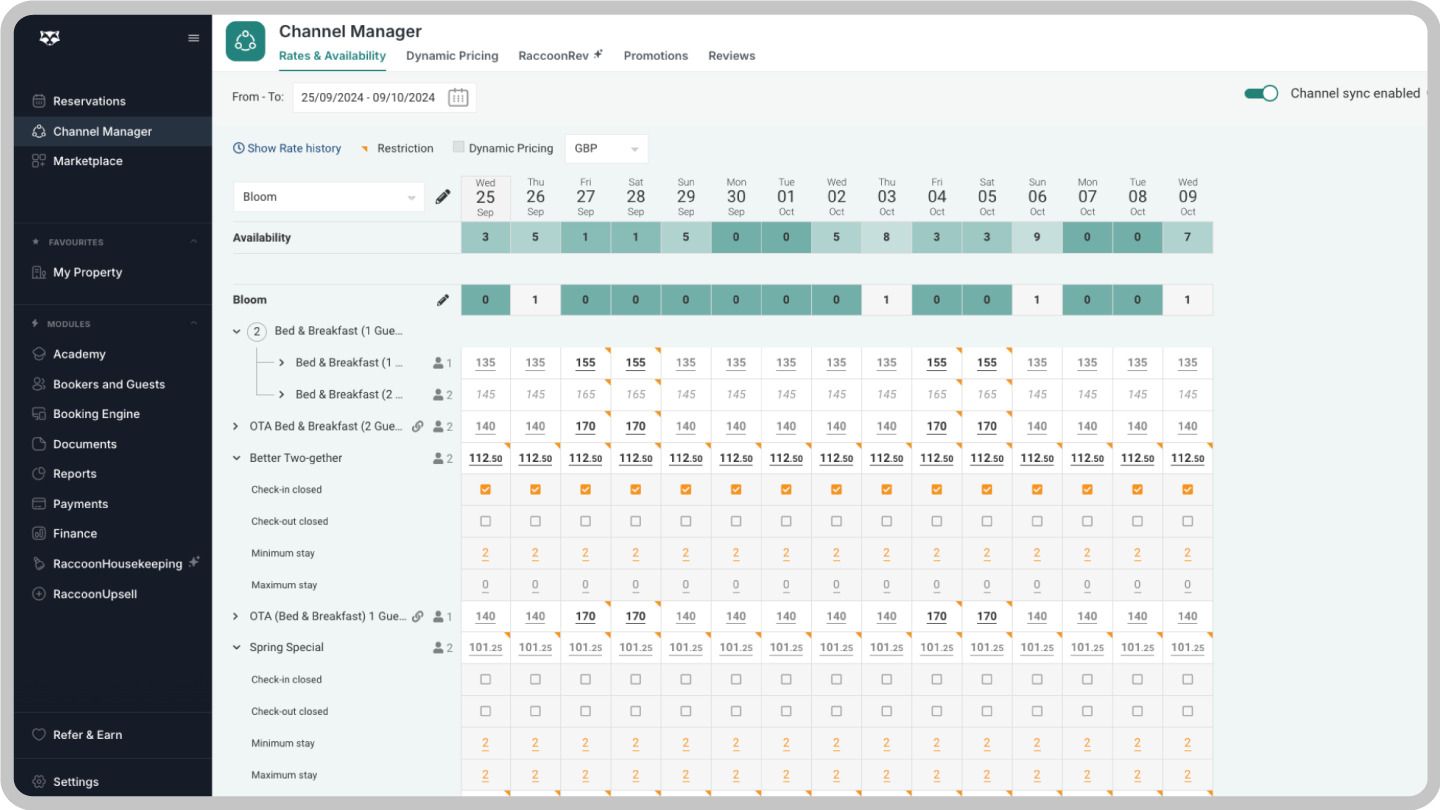
Your channel manager connects your hotel booking system with sales channels such as Booking.com, Expedia and Airbnb. Rates and availability are synchronised across connected channels, helping your team manage a busy bank-holiday weekend or a quieter midweek period from one place.

  • Bring booking channels together. Connect relevant OTAs and distribution partners rather than updating each channel separately.
  • Apply your pricing rules. Configure dynamic rate adjustments to support your pricing strategy as occupancy changes.
  • Reduce the risk of double bookings. Synchronised inventory limits manual availability updates; correct room mapping and active connections remain important.
  • Offer a choice of rates. Manage refundable and non-refundable options and packages, such as a weekend stay with breakfast.

PAYMENTS

Manage deposits, payments and refunds together

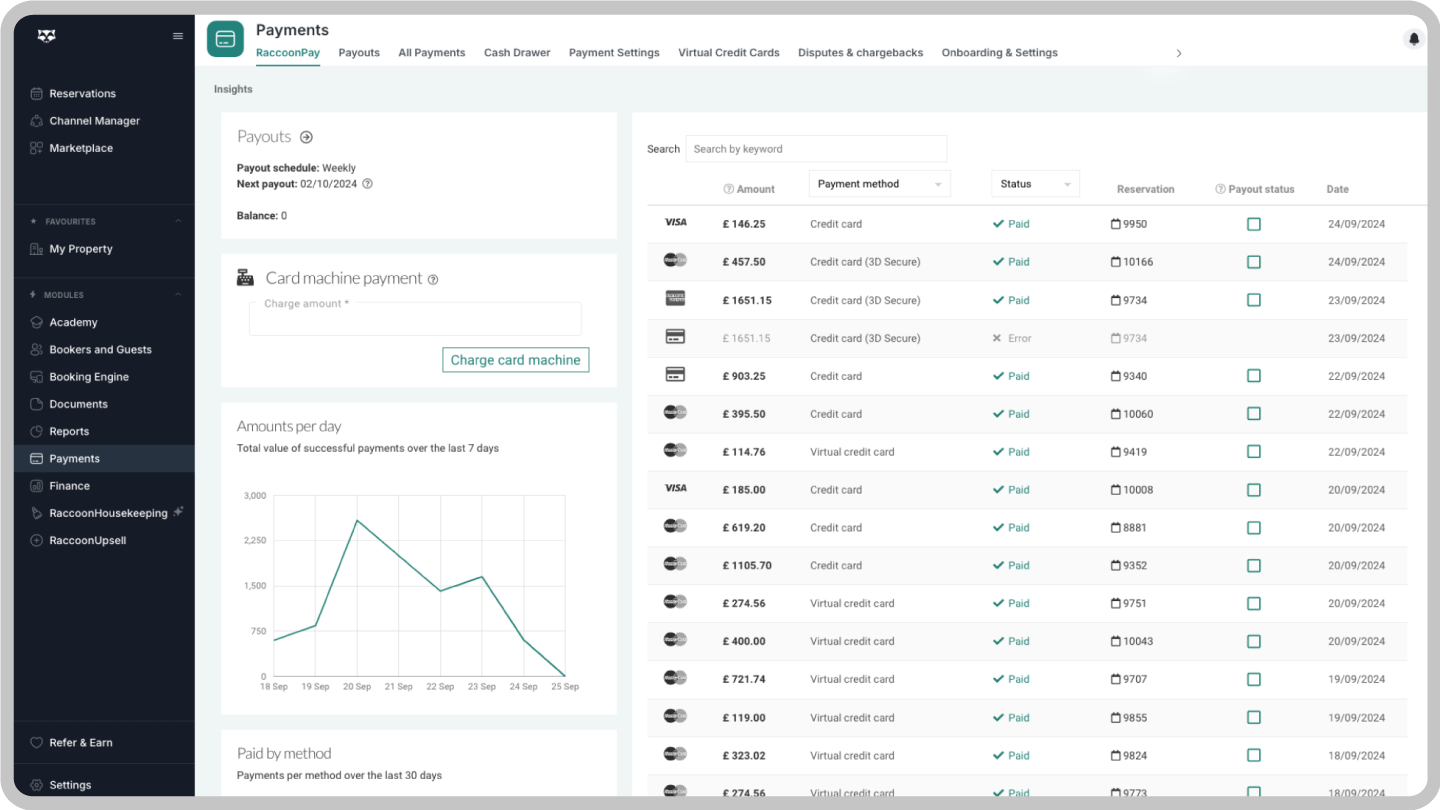
Keep payment activity connected to each reservation, from an advance deposit to the final balance at check-out. Explore integrated hotel payments and confirm supported methods, settlement arrangements and transaction fees for your UK property.

  • Request payment and manage refunds. Send a payment link or initiate an eligible refund from the reservation, in line with your cancellation policy.
  • Take payments at reception. Add the RoomRaccoon Card Machine to connect in-person payments with guest reservations; equipment and transaction charges may apply.
  • Manage OTA virtual credit cards. Use the VCC dashboard to track cards and automate charging where supported by the booking and payment setup.
  • Follow up on payment disputes. Use the Chargebacks dashboard to monitor cases and submit supporting information.

Rates and packages

Create room-only and breakfast packages, configure linked rates and organise group reservations with Room Allotment. Build offers around the stays your hotel actually sells.

Dynamic room pricing

Set rules to adjust room rates as occupancy changes. Explore revenue management tools if you also need competitor insights to inform your pricing decisions.

PACKAGES AND UPGRADES

Choose the right features for your hotel

Start with a connected PMS, booking engine, channel manager and integrated payments. Compare the RoomRaccoon packages and pricing to see which features and upgrades suit your room count and daily workflows.

Make the total cost clear: review the subscription, onboarding, selected upgrades, third-party services and payment processing fees before choosing your package. Ask for a UK quote confirming the billing currency and VAT treatment.

Switch booking systems with a clear onboarding plan

Personalised setup
Work with the onboarding team to configure your rooms, rates and booking settings around the way your hotel operates.
Team training
Train reception and management on the workflows they will use, from recording a booking to handling payments and check-out.
Plan your go-live date
Agree a realistic launch date around data preparation, channel connections and staff availability. Review the setup before accepting new bookings.
Data import
Review which future reservations and guest details can be imported from your current system. Agree the export format, scope and checks before the switch.

Connect the tools your hotel relies on

See how your UK hotel could manage bookings, availability and payments in RoomRaccoon. Bring your room count, booking channels and current setup to the demo.

Hotel booking system: your questions answered

1What is a hotel room booking system?
An online hotel booking system helps accommodation providers accept reservations and manage room availability, rates and guest information. RoomRaccoon combines a property management system (PMS), website booking engine, channel manager and integrated payments. These connected tools support the booking journey from a guest choosing a room to the hotel managing the stay.
2How do the booking engine, channel manager and PMS work together?
The booking engine takes direct website reservations, the channel manager exchanges rates and availability with connected sales channels, and the PMS manages reservations and daily hotel operations. In RoomRaccoon, these components work together. Read our hotel booking engine guide for a closer look at website bookings.
3Who is RoomRaccoon's hotel booking software designed for?
RoomRaccoon serves independent accommodation businesses, including hotels, B&Bs and guest houses. A UK hotel with a small reception team can use the connected platform to manage reservations and guest administration. The right package depends on your room count, property setup, required integrations and the workflows you want to manage.
4Are direct website bookings commission-free?
RoomRaccoon does not charge booking commission on direct reservations through its booking engine. Your software subscription and payment processing charges still apply, as do any separately selected services. Bookings made through an OTA remain subject to your agreement with that channel. Commission-free therefore does not mean that operating the system is cost-free.
5Can I add the booking system to my existing hotel website?
Yes. RoomRaccoon's booking engine can connect to your existing hotel website so guests can check availability and reserve directly. Discuss the setup with your website provider during onboarding. RoomRaccoon includes its own PMS; it should not be assumed to connect to every external PMS or payment provider.
6What happens when a guest makes an online booking?
The guest chooses dates, an available room and a rate, then supplies the required details and follows your configured payment process. The reservation is recorded in RoomRaccoon, a confirmation is sent and availability is updated through connected channels. Payment requirements depend on the rate and settings you have chosen.
7Can guests book on mobile devices and in different languages?
RoomRaccoon provides a mobile-friendly booking engine and localisation options for international guests. During setup, choose the available language and currency options that suit your market. Ask to see the guest journey on a phone during your demo, including how room information, prices and payment steps are presented.
8Can the booking engine reflect my hotel's branding?
The booking engine offers customisation options so the booking journey can reflect your property. Review the available branding settings during your demo. If you need a custom domain or removal of RoomRaccoon branding, discuss the RaccoonWhiteLabel upgrade and confirm whether it is included in your selected package.
9Can I automate guest emails and arrival information?
RoomRaccoon supports automated guest emails, including booking confirmations and pre-arrival communication. Configure your templates and timing to explain practical details such as check-in arrangements or how to request an extra. Check the supported message types and channels before assuming that every guest conversation will be handled automatically.
10Does RoomRaccoon connect to Booking.com, Expedia and Airbnb?
The channel manager supports connections with Booking.com, Expedia and Airbnb. It synchronises rates and availability with connected channels and brings reservations into your PMS. Room and rate mapping must be set up correctly. This reduces manual work and the risk of overbookings, without guaranteeing that a booking conflict can never occur.
11How can the system support more direct bookings and room revenue?
The website booking engine gives guests a direct route to reserve, while packages, extras and pricing tools help you develop your offer. Results also depend on demand, your rates, website traffic and how you use the tools. Read the L'Enclume case study for a British hotel example.
12Can I manage deposits, payment links and refunds?
Integrated payments supports payment requests, deposit tracking and refunds from the reservation workflow. Pre-authorisation and virtual credit card tools are also available. Confirm the supported payment methods, charging rules and fees for your setup. Refunds should follow your cancellation policy and applicable payment conditions; a cancellation does not necessarily trigger an automatic refund.
13What should I check about guest data and payment security?
Review RoomRaccoon's current security and data-processing information alongside the payment services you plan to use. Confirm staff access, guest-data handling and your responsibilities as the accommodation provider. Payment features such as tokenisation can reduce exposure to card details, but using hotel software does not by itself guarantee your property's compliance.
14Is RoomRaccoon a cloud-based hotel booking system?
Yes. RoomRaccoon is cloud-based, allowing staff to access the system through an internet connection. Ask to see the tasks your team needs on its usual computers, tablets or phones during the demo. Device suitability can differ by workflow, and access depends on the connection and the permissions assigned to each user.
15Can RoomRaccoon support more than one property?
RoomRaccoon offers options for multi-property businesses. Discuss your locations, room types and management structure so the team can explain the available setup. Confirm which workflows, booking-engine options and reports operate across properties, and which are managed separately, before choosing a package for your hotel group.
16Which accounting, EPOS and door-access systems can I connect?
RoomRaccoon's integrations directory includes partners for accounting, point-of-sale, access control and other hotel services. Check your exact provider and the data the connection exchanges. Availability, setup requirements and third-party charges can vary; a partner logo does not mean that every product or version is supported.
17Which reports can help me manage hotel performance?
RoomRaccoon provides operational and financial reporting, including occupancy, room revenue and deposit tracking. Use these reports to review booking activity and plan daily work. During your demo, ask to see the reports you already rely on and confirm the available date ranges, detail and export options for your package.
18How long does it take to switch hotel booking systems?
The timetable depends on your property setup, data preparation, channel connections and training needs. RoomRaccoon's onboarding team helps plan the work and agree a go-live date. Review the onboarding programme and discuss any peak trading dates you need to work around before scheduling the change.
19Can existing reservations be transferred from my current system?
RoomRaccoon provides data-import support during onboarding. The transferable information depends on what your current provider can export and the agreed import scope. Prepare your future reservations and relevant guest details, then confirm how deposits, notes and historical records will be handled. Reconcile the imported records before moving to the new system.
20How are cancellations, amendments and no-shows handled?
Your team can manage changes through the reservation workflow and review the associated payment position. The action required depends on the booking source, rate conditions and cancellation policy. Check channel-specific requirements, any refund due and the updated availability instead of assuming every cancellation or no-show is processed in the same way.
21How much does a hotel booking system cost in the UK?
The cost depends on room count, subscription choice, required features and additional services. Compare RoomRaccoon pricing and packages, then request a quote for your property. Review onboarding, upgrades, payment processing and third-party fees as well as the subscription. Confirm the billing currency, VAT treatment and renewal terms.
22What training will my hotel team receive?
RoomRaccoon's onboarding includes training to help staff use the system. Plan around the roles in your team and practise the tasks they will perform, such as creating a reservation, checking a payment and preparing arrivals. Allow time for questions and checks before go-live; training needs differ between properties.
23What support is available after setup?
RoomRaccoon provides customer support as well as onboarding and training resources. Before subscribing, confirm the contact channels, UK opening hours and any package-specific support arrangements. Ask how urgent booking or payment issues are reported and escalated, so reception staff know what to do when they need help.
24What is included, and which features are upgrades?
RoomRaccoon combines the PMS, booking engine, channel manager and integrated payments in its core platform. Tools such as RaccoonUpsell, RaccoonHousekeeping and RaccoonRev, plus selected integrations and equipment, depend on your package and chosen upgrades. Payment transaction fees are separate from the subscription. Compare the current package details against your requirements.
25What should I ask to see in a hotel booking system demo?
Bring your room count, current software, booking channels and the tasks that take most time. Ask to follow a website booking into the calendar, review a deposit, amend the stay and prepare check-out. Use the demo to confirm your integrations, migration scope and total costs. Book your RoomRaccoon demo.